






SecretGrant: business credentials managed and protected like files
SecretGrant is an extension of FileGrant, CyberGrant's file-centric platform, that brings the same protection to business passwords, API keys, and tokens. Every credential is organized, shared, and revoked like a file.
No installation needed: it runs inside the FileGrant interface, with the folders and permissions your teams already know.
Personal password managers protect individuals. SecretGrant protects the company.
Business credentials still live in files, chats, and personal devices. Without logs or a way to revoke access, you lose control of company passwords.
A personal password manager keeps one user's passwords safe. Inside a company, the same credentials move between colleagues, departments, and vendors, and they need rules that apply to everyone.
SecretGrant manages credentials like files in FileGrant: encryption, folders, tags, access permissions, controlled sharing, and activity logs. You can revoke access to a credential without changing the password, and see who viewed it, when, and from where.
SecretGrant is already part of the FileGrant platform, with nothing extra to deploy.
Built into FileGrant. Ready on day one.
SecretGrant opens in the same FileGrant interface, with no client to install and no separate system to manage. Credentials get the same quantum-safe encryption as your documents, based on CRYSTALS-Kyber, and the same folder and tag structure your teams already use.
Ease of use and governance, under the company's control.
Keep company credentials under control. In four steps.
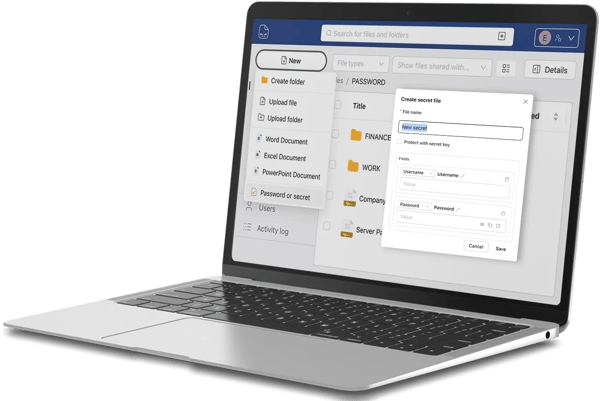
Create a credential in any folder, just like a file. Add username, password, URL, and notes.
If the secret is critical, add an encryption password. Only those who know it can access it.
Give access only to those who need it, with clear permissions you can manage at any time.
Every access is logged. If something changes, revoke access and stop the risk immediately.
You always know who has access. And you can stop it instantly.

Give access to a colleague, a team, or a department with view, edit, or expiration settings. If things change, revoke it in one click without touching the password.
Critical secrets are encrypted with user-controlled keys. Not even admins can access them.

Folders, subfolders, and tags, with the same logic as your files. Nothing new to learn and no migration: passwords stay where you already work.

See who opened which credential, when, and from where. Every view stays in the activity log, ready when an audit asks who had access to a system.
Control.
Security.
Visibility.

Create strong passwords directly in the platform.
No more weak, rushed credentials.

When someone leaves the team, remove their access in one click and they can no longer open any credential. The activity log shows which ones they viewed, so you know which passwords to change first.

Frequently asked questions about SecretGrant
SecretGrant is an extension of FileGrant, CyberGrant's file-centric platform, built for business password and secrets protection. It manages passwords, API keys, and tokens like files: encrypted, organized in folders and tags, shared with permissions, and revocable at any time. Every access to a credential is recorded in the activity log.
Yes. SecretGrant is a FileGrant extension and runs in the same interface, with no client to install. People sign in with the access already set up for FileGrant, including single sign-on with Microsoft Entra ID or Google and the company's two-factor authentication.
Server and application passwords, API keys, authentication tokens, and infrastructure access. In SecretGrant, each credential is a container with up to 10 fields (for example username, password, URL, and notes) and an optional secret key. The built-in generator creates strong passwords with configurable length and characters.
The credential owner grants access to a colleague, a team, or a department, with view or edit permission and, if needed, an automatic expiration. When needs change, SecretGrant revokes access in one click without changing the password, and the activity log records who opened the credential, when, and from where.
The admin removes their access, and from that moment the person can no longer open any credential in SecretGrant. The activity log shows which credentials they viewed and when: that is where you decide which passwords to change first and how you document access during a compliance review (NIS2, DORA, GDPR).
Only people with permissions on that credential. Credentials get FileGrant's quantum-safe encryption, based on CRYSTALS-Kyber (NIST FIPS 203). For the most critical ones, SecretGrant adds encryption with a key chosen by the user, so the content is readable only by whoever knows it. Not even the system administrator can open it.
A personal password manager keeps one user's passwords safe. SecretGrant is built for the credentials a company shares across people, departments, and vendors, and manages them with the same rules as documents in FileGrant: folders, tags, permissions, expiration dates, and activity logs. Security teams govern files and business passwords from one place.
Your company credentials deserve the same protection as your data
How to manage shared passwords and access while always knowing who sees them and for how long.Book a free consultation
See how to secure and control your company credentials, passwords, and access.