
Interface Structure
After logging in, you access the main interface, organized into three areas:
-
Right-Side Navigation Menu
Includes all platform sections: Files, Received, Shared, Favorites, Hidden, Trash, and — depending on your role — Users, Groups, Audit, Settings, Tags.
-
Main Workspace
Displays the content of the selected section, including files and folders you can interact with.
-
Top Bar
Provides search tools, file type filters, and the option to switch between list and grid view.
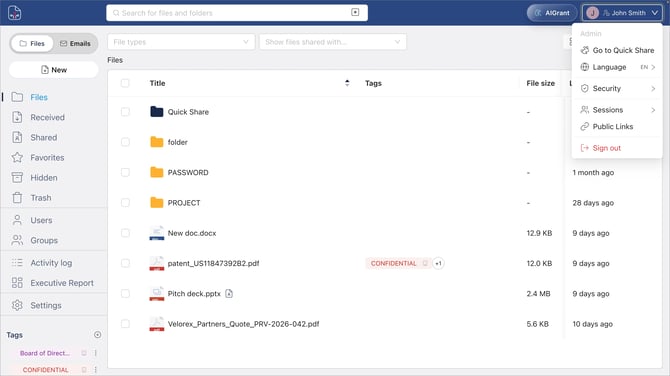
User Menu (Top Right)
Click your name in the top-right corner to:
-
Access Quick Share for fast link-based sharing
-
View active sessions
-
Log out